Here they are before the reveal. Let’s see how close I got…

Also added Clare’s image;
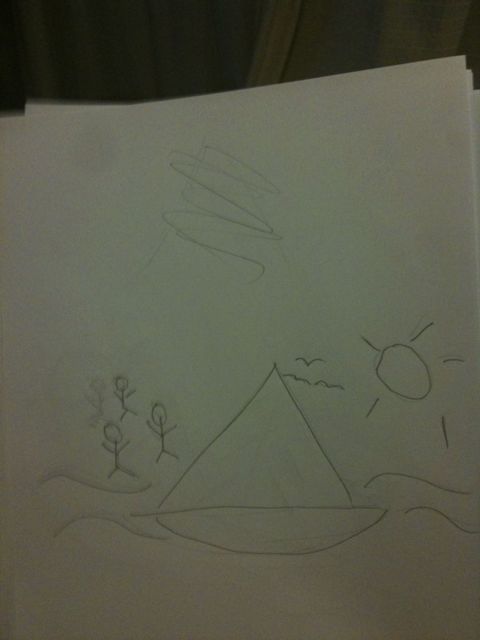
Here they are before the reveal. Let’s see how close I got…
Also added Clare’s image;
With a title like that, you may expect me to rant about the terrible phrase ‘more unique,’ and why you should never use it. It’s one of those long-held orthodoxies about English that ‘more unique’ is illogical, because something is either unique, or it isn’t, and thus ‘more unique’ is nonsense. The same advice holds for absolutes like ‘perfect,’ ‘full,’ or ‘fatal’. (Various examples; [Wikipedia](http://en.wikipedia.org/wiki/Comparison_%28grammar%29), [Dr Grammar](http://www.drgrammar.org/faqs/#53), [Grammar Girl](http://grammar.quickanddirtytips.com/modifying-absolutes.aspx))
This isn’t true. There are times when you can use the phrase, and this post covers those situations.
Uniqueness describes how one thing in a group has a property exhibited by no other; ‘the only left-handed pupil in the class,’ or ‘the only green apple in the orchard.’ Uniqueness always exists within a set of things. In the preceding examples, pupils in a class or apples in an orchard. That set of things, however, may be part of a larger set. A class of pupils is part of a school, a district, and all the kids of the same age. Sets of apples may be found in baskets, orchards, or supermarkets.
When you move from comparing a small set to a larger set, you find that the rules of uniqueness change. Left-handedness may be unique in a class but not in a school. Blue eyes may be unique in a family of brown-eyed children, but red eyes may be unique within a much larger grouping (for example, from rare cases of [albinism](http://en.wikipedia.org/wiki/Albinism))
When you shift from a small set to a larger set, then, the rules of comparison change; in doing so, the phrase ‘more unique’ reflects a _new kind of uniqueness_ — uniqueness in the larger set. So it becomes reasonable, though not very stylish, to say;
> No-one in the family had blue eyes except John, but Jane’s more unique red eyes entranced him.
or
> Every child in the race had already won the blue ribbon for being the fastest in their class, but now they were competing for the prestigious and far more unique Flanders Cup, awarded to the fastest of the fast.
So, in summary; if the set changes from a small to a large, ‘more unique’ makes logical sense, and means ‘unique within the larger set.’
Of course, the main reason to challenge any orthodoxy is when it impedes eloquence. While [Truth is beauty and beauty truth](http://englishhistory.net/keats/poetry/odeonagrecianurn.html), _beauty should always be allowed to win_. Otherwise we would never have this;
> We the People of the United States, in Order to form a [more perfect Union](http://en.wikipedia.org/wiki/Preamble_to_the_United_States_Constitution), establish Justice, insure domestic Tranquility, provide for the common defence, promote the general Welfare, and secure the Blessings of Liberty to ourselves and our Posterity, do ordain and establish this Constitution for the United States of America.
Which is a glorious sentence. Fie upon those who would have us write ‘in Order to form a better union.’
I may tackle other orthodoxies in the future. Stay tuned.
This year, my long-time friend Derek Muir attended the Clarion writer’s workshop. One thing he brought back was [an essay called ‘Thickening the Plot’][ttp] by Samuel R Delaney, who had been an instructor at Clarion in the 70s. I bought the larger book that contains it — ‘About Writing: 7 essays, 4 letters, and 5 interviews.’
It’s a wonderful book. In the essay that follows, I have taken some of his ideas, mixed in my own interpretations and thoughts, and generally corrupted and polluted his work to create my own synthesis. What follows, then, should not be taken as his views, but my own.
In the introduction to the book, Samuel R Delaney makes a distinction between three levels of literary skill: those who can’t write, good writers, and talented writers. The first group is basically most people; not illiterate, but people who have neither inclination nor aptitude nor necessity. The next group — good writers — are those who can write grammatically, want to put down fiction, and may have done so. We can imagine that maybe they have done well during English lessons at school and were told they were better than their peers, or had been encouraged by parents. They are probably avid readers. The talented group are people with something extra beyond competence and desire.
It’s the middle group — the good writers — who produce generally poor fiction. How could they not? Who else produces it? Certainly not the non-writers, because they aren’t producing anything, and not the talented, because their stuff is the really good fiction. For me, it was counterintuitive that competent writers are — must be — responsible for bad fiction. Now that that idea is in my head, I can’t seem to shake it.
Delaney writes:
“However paradoxical it sounds, _good writing_ as a set of strictures (that is, when the writing is good and nothing more) produces most bad fiction. On one level or another, the realization of this is finaly what turns most writes away from writing. _Talented writing_ is, however, something else. You need talent to write fiction.”
If you can string a sentence together, but you know you’re not writing to the same standard as the authors of the great classics — authors like Milton, Austen, Dickens, Melville, Hemingway, Lovecraft, Orwell — then you are a Good Writer. And you are probably producing dross.
This comparison with the greatest authors of all time should loom over you and oppress your soul. You must be crushed down by the weight of a thousand masterpieces, each one pressing upon your soul and leaving you awestruck. Then, you must take these great works and absorb them, read them to find their secrets, learning from them what you need to first do as well as them, and then surpass them. Without the visceral, breathless need to reach the very pinnacle of excellence, and without the knowledge of what constitutes that pinnacle, chances are you will not succeed.
Why must you strive to reach so high? Isn’t it enough to be merely good? No. Here’s why.
Let’s imagine you’re a science fiction writer, and you want to write novels, have them published, and see them sell. What you want specifically is this; you want your novel shelved alongside _Neuromancer_ and _1984_ and _The Hitchhiker’s Guide to the Galaxy_ and _The Moon is a Harsh Mistress_. You want me to flick through all these books, and yours, and for me to put those books back on the shelf and take yours to the tills. Well, then you’d better write better cyberpunk than Bill Gibson, or better distopias that George Orwell, or I’ll just buy their books instead. You must aspire to beat the best authors in history at their own game; you are in competition with them. It is not viable to attempt anything less.
For myself, I imagine some avid reader, entering a bookshop and glancing, by chance, at the spine of my book, shelved there under ‘Cooper’. Just to the left are books by C.J Cherryh and Orson Scott Card. To the right, Samuel Delaney and Philip K. Dick. _Even while staring at my book,_ his peripheral vision hits four Hugo-award winning novels. When he reaches out his hand to pick up my book, with the smallest twitch his fingers brush _Ender’s Game_ and _Do Androids Dream of Electric Sheep?_.
My book has to be very good indeed to make that sale.
I just did an on-line typing speed test, and it turns out I managed 54 words per minute. Which made me wonder — at that speed, how much time would it take me to get a novel written? If I could operate at that rate while writing fiction, what could I get done?
Turns out 24 hours of typing at that speed gets 78,000 words down on paper. That’s a good sized novel, in 24 hours.
Now, if you can actually type out the contents of a novel in 24 hours, what does it mean when someone says they spent 6 months writing a novel? Because it certainly doesn’t mean they spent six months typing. (Butt on seat for two hours a day, that’d be about a million words.)
In fact, it makes you wonder why we call it ‘writing’ in the first place. There may have been a time, I suppose, back when we pressed styluses into clay, when the content we were writing was simple and the process of making marks was laborious. Back then it was reasonable to say we were spending our time writing. But that’s not so any more. With a comfortable word processor, getting words down is trivial. So calling ourselves ‘writers’ is perhaps disingenuous. What we’re doing isn’t writing — can’t be, or we’d be finished much sooner. People would comfortably knock out a novel in a weekend. The bulk of the activity has to be something else; imagining, maybe? daydreaming?
This is one of those posts where I don’t have the answers, but I hope an interesting question. Like dark matter, the real activities of writing fiction are somewhat invisible to us, but constitute the vast majority of the whole. Because from the outside we just look like we’re typing, what we do is called writing. But I feel that might be like calling the act of driving ‘seatbelt-wearing.’ Sure, you wear your seatbelt throughout the whole process, but that’s not where your attention is. It’s not what you’re doing.
So there are some consequences. If writing time is trivial, then any idea which uses the word ‘writing’ to describe fiction-creation is literally incorrect.
For example, a piece of advice handed down with great regularity is this; ‘write every day.’ Is it because the act of committing words is important _per se_? No . The other ‘dark matter’ fiction-making activities must be engaged on a regular basis. ‘Write every day’ gets us sitting down and our heads running the processes that create scenes and characters and drama.
What’s worth considering, then — what constitutes story-making and literature-creation — is a series of processes, mostly mental, mostly transitory, the _final_ process being the mechanical typing of words. I can think of three main processes;
1. Imagine a scene in your story-world.
2. Convert the scene to language in your mind’s ear.
3. Transcribe the language onto paper or computer.
But note how step 3, the writing, is the thing we’re urged to do. It’s backwards. We should be advised to daydream every day. We should be told to babble about what we see in our minds every day. I suppose it’s not surprising that we don’t hear this advice, but these things are the core processes of fiction.
I suppose what I’m looking for, after all this, is an understanding of the mental processes that make up fiction writing. And I don’t what it described in terms of the end results. ‘writing’ creates written words. ‘characterisation’ creates characters. ‘plotting’ creates plot. But words, character, and plot are all artefacts, the output of something, and it doesn’t much help to just make nouns into verbs and talk about writing and characterisation and plotting. I want to talk, and think, about causes, the things that cause plot and cause character and cause language.
PS: It took me exactly 1 hour to write this post of 662 words. Which means only 20% of the time was taken by writing — 80% of the time taken was taken by these other processes.
Clare has just passed her second exam, which means she now holds the same qualification [I earned last week](http://www.stevecooper.org/2009/08/06/i-qualified-as-a-microsoft-certified-technical-specialist/) — she’s now a [Microsoft Certified Technical Specialist](http://www.microsoft.com/learning/en/us/certification/cert-vstudio.aspx) in ASP.NET applications.
Go Clare!
The rather marvellous [Translation Party](http://translationparty.com/tp/) allows you to enter an english phrase, which gets translated to japanese, then back to english, then back to japanese, continuing until it reaches equilibrium. It’s fun.
Here’s the best I’ve found so far. Sorta explains the WWII war in the pacific;
pearl harbour is heavily defended
パールハーバー強く擁護され
Pearl Harbor is a strong advocate
真珠湾の強い支持者です
Pearl Harbor is a strong supporter of
真珠湾攻撃の強力な支持者であること
Be a strong supporter of the attack on Pearl Harbor
真珠湾攻撃を強く支持して
Strongly support the attack on Pearl Harbor
真珠湾攻撃を強く支持
Strongly supports the attack on Pearl Harbor
真珠湾攻撃を強くサポートしています
We strongly support the attack on Pearl Harbor
Some other good ones;
“better to rule in hell than serve in heaven”
> We do recommend that you provide the rule of hell in heaven
“and behold, a pale horse, and him that rode him was death”
> He is a pale horse death
“to be or not to be”
> please.
“cry havoc, and let slip the dogs of war”
> Shouting, confused, throwing the dogs of war
“shall I compare thee to a summer’s day?”
> Summer 2006, any comparison of him?
On tuesday I passed my MCTS exam in web development.

This is basically the certification that I can put a website together. I think I’m getting a bit of a taste for these qualifications…
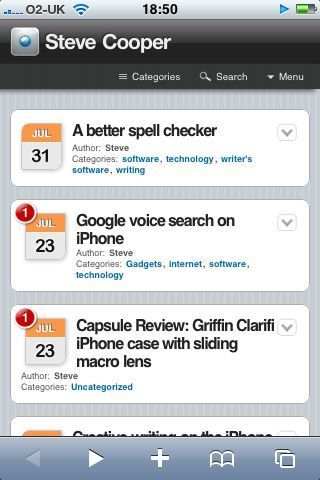
I have discovered an awesome plugin for wordpress called [wptouch](http://www.bravenewcode.com/wptouch) which is a skin for wordpress which only activates when you read from an iPhone. It makes a much cleaner interface for your blog, I think. Here’s the snapshot from safari;
Somewhere between spell checking and grammar checking is a need for context-specific word checking. I’ve been doing a little writing on the soft keyboard of the iPhone and noticed that while the spell checker is great at correcting mis-spelled words, it is not good at helping you out with words within a certain context. Consider typing this;
Science diction
Now, that’s a single character incorrect; both words are spelled correctly, but so rarely occur together in English prose that we may suppose there is probably a spelling mistake here. Any mobile provider that gets this right will probably make these keyboards entirely workable. It may not be so relevant on full-sized keyboards, but these smaller keyboards have implicitly more mistakes. Much smaller keys combined with big fat thumbs makes this kind of mistake much more likely. In fact, I’ve done it four times this post;
Fill-sized keyboards
Big far thumbs
Done it twice this lost
Dome it three times this post
Done it four tomes this post
Awful. I can’t even wrote the list of my mistakes without making the same type of mistakes over and over.
Anyway, I think if this kind of correction could be built into a smartphone editor, it would lead to much faster typing. You would be able to slap in text much faster, not worrying so much about what you really typed, and have the editor figure out from a corpus of English text what you probably meant.
Good lord. I have just discovered that Google’s ‘Google Mobile’ application on the iPhone has voice search. Go to the search page and bring the phone to your ear. The accelerometer tells the app to start listening. Then just speak your search, and away it goes. I’ve done a half-dozen searches and it has been spot on every time.
The future really is with us, my friends. Just to prove it to myself, I held the device up to my mouth and asked it for information on ‘transparent aluminium.’ It worked. I am Scotty, and the idea of accessing the databanks with a mouse and keyboard are starting to seem a little quaint.

